

Cybercriminals Using New Tricks to Disguise Their Phishing Attacks
Last updated June 18, 2026
“Phishing” scams, where cybercriminals impersonate a trusted entity—such as a bank, government agency, or delivery service—are the number one cyber threat faced by most Americans. These email and text messages, which are designed to trick you into providing sensitive information, such as Social Security numbers, passwords, or credit card numbers, are blamed for most cyber-enabled crimes, according to the FBI’s 2026 Internet Crime Report.
Listen to audio highlights of the story below:
The sheer volume of the attacks, via email and text messaging, is overwhelming. During the first quarter of 2026, Microsoft Threat Intelligence detected approximately 8.3 billion email-based phishing threats.
Text-message phishing (called “smishing”) is now the primary means of attack, accounting for 30 percent of all observed cyber scams last year, according to the Cyber Readiness Report.
Phishing attacks are no longer limited to email and text messages. Cyber-thieves are using instant messaging apps, social media, malicious advertisements, bogus QR codes, and copycat websites to target their victims.
“The tactics that used to work back in the 2010’s are not the same today,” said Mark Beare, general manager for consumer business at Malwarebytes, a digital security firm. “They’re much, much, much more advanced.”
Phishing has become so lucrative, Beare told Checkbook, that bad actors are “choosing to invest money to fool people, just like marketing companies will in customer acquisition.”
Why Is It Called Phishing?
The term “Phishing” was officially coined around 1995 to describe criminals who used digital “bait” to “lure” victims into sharing sensitive information.
We’ve come a long way since the “Nigerian Prince” emails that claimed you’d get rich if you helped move millions of dollars out of Africa. Those emails typically were filled with typos and grammatical mistakes.
Most phishing attacks still rely on social engineering tricks—using fear, urgency, curiosity, and emotional appeals to manipulate people into compromising their own security. They involve fake texts and emails claiming there’s a problem with a package delivery, warning that you owe a parking toll, or that there’s a problem with your tax return. They’re designed to get you to respond instantly, without thinking.
The latest attacks have evolved into highly sophisticated campaigns that are difficult to spot. Here are two examples of the new threat: fake invites and corrupted CAPTCHA forms.
Fake Digital Invites
Con artists know that most people will open an electronic invitation to a party or other social gathering. So they’re sending malicious invitations that appear to be from a well-known online invitation platform, such as Evite, Paperless Post, or Punchbowl.
“While fear and urgency are common threads with a lot of scams, it’s not a requirement, said Eva Velasquez, CEO of the non-profit Identity Theft Resource Center. “With the Evite phishing attack, the fraudsters are using your desire for connection and to be social to get you to click on a link that you weren’t expecting.”
If you click the link, bad things can happen: Either malware will be downloaded onto your device, allowing criminals to steal your personal information, or you’ll be redirected to the scammer’s copycat website that will prompt you to enter your email password, which will provide the scammers with direct access to your email account, which can have serious repercussions.
You may not consider your email a sensitive account, but “it’s the keys to the kingdom,” Velasquez warned, because if criminals can compromise your email account, they can use it to reset passwords on other accounts. So, never enter your email password for any reason except to log in to your email.
Evite, Paperless Post, and Punchbowl have issued warnings about the growing problem. Their blog posts share tips on how to spot the scams. Here’s how to protect yourself:
- Check the sender’s email. The invite will always come from the official corporate URL. If there’s a personal email address, such as from Gmail, Yahoo, or Hotmail, it’s fake.
- Inspect the links. Hover your mouse over the “click here” link to see the actual URL. If it doesn’t lead directly to the official platform (evite.com, paperlesspost.com, punchbowl.com, etc.), don’t click it, regardless of how legitimate the invitation looks.
- Don’t provide any passwords. A legitimate invitation won’t prompt you to log into your email or provide your email password to view the card or RSVP.
- Don’t download any files. Authentic invites don’t contain attachments or require a download. You can open them directly.
Compromised CAPTCHAS
Many websites require you to prove you’re a human, not a robot, before you can log in. One common method is CAPTCHA verification. Typically, you’re shown a grid of images and asked to click on objects (such as traffic lights, cars, or bicycles), or you’ll be asked to enter a series of distorted letters or numbers that are displayed on the screen.
Because we see CAPTCHA challenges so often, we might automatically respond as directed to prove we’re not a robot and get to the next screen. As Malwarebytes warns, the evil genius of this attack is mixing something routine with instructions that are not.
There are many variations of the CAPTCHA scam, but the most common one starts with a malicious command that’s automatically copied to your clipboard, along with instructions to run it in the Windows Run dialog box (Win + R). The image below from Malwarebytes shows a real CAPTCHA on the left and a bogus one below.
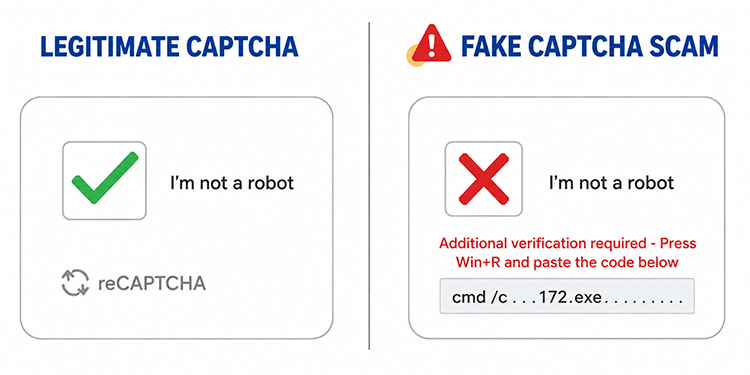
Fall for this trick, and you’ll download malware that gives the criminals access to the device.
Protect yourself: A legitimate CAPTCHA will never ask you to download software or run a program to access the website you want to visit.
Don’t Trust, Always Verify
Cyberfraud is a growing and an “ever-evolving threat,” fraud-fighter Velazquez told Checkbook. Scammers can operate from anywhere in the world, using readily available software and stolen personal data bought and sold through sophisticated online fraud marketplaces.
As a result, we’re being bombarded with malicious communications. The average American now receives 14 scam messages per day, according to McAfee’s 2026 State of the Scamiverse report.
Even worse, bad actors are using artificial intelligence (AI) tools to make their bogus text and email messages nearly impossible to detect. The old advice to look for typos or bad grammar no longer applies. With AI, it’s easy to create a perfect message that appears to come from a trusted company.
“You need to be much more cautious and assume that something is malicious first, before developing some trust with a message, a website, or anything you’re looking at,” Malwarebytes’ Beare said.
If you’re not sure about a text or email you receive, check it out before you click or download anything. Search online; ask a friend or family member; contact the Identity Theft Resource Center (888-400-5530); or call the AARP Fraud Watch Network (877-908-3360). You don’t need to be a member to use this service.
More from Checkbook:
- Fraud Prevention: Top 12 Ways to Protect Yourself
- Don’t Fall for Bogus ‘Unpaid Toll’ Text Messages
- Cyber Criminals Are Using A.I. to Supercharge Their Scams

Contributing editor Herb Weisbaum (“The ConsumerMan”) is an Emmy award-winning broadcaster and one of America's top consumer experts. He has been protecting consumers for more than 40 years, having covered the consumer beat for CBS News, The Today Show, and NBCNews.com. You can also find him on Facebook, Blue Sky, X, Instagram, and at ConsumerMan.com.